





- Analytics
- Campaigns
- Content platforms
- Marketing sites
Product design for
martech and adtech
We design campaign tools and analytics dashboards for marketing teams. We designed the onboarding flow and campaign analytics for Studio19, a marketing platform for car dealers.
When a martech
product needs design help
Problems we often see in martech products.
Reports take longer to read than to build.
Charts and tables pile up, and the key number gets lost.
How we helpReports that lead with the key number and keep the detail behind it.
Campaign setup has too many steps.
Targeting, budgets and creatives are spread across screens.
How we helpA setup flow that keeps targeting, budget and creatives together.
Power users and newcomers want different things.
One interface tries to serve both and fits neither.
How we helpSimple defaults with advanced controls one step away.
Content looks different on every page.
There is no system for layouts, graphics and templates.
How we helpA system of layouts, graphics and templates for every page.
Across Nexa’s projects
since 2023
Projects delivered
300+
- 150+clients in the US, Europe and beyond
- 2 daysuntil a designer starts
Related B2B design work
Selected work
Some of the products we designed, and what the clients said afterwards.

Faster content publishing
Website redesign and a custom theme for a corporate travel platform.
“The team was always open to feedback.”
 Anastasia KotinopoulouMarketing Manager, C Teleport

10% revenue growth over a quarter
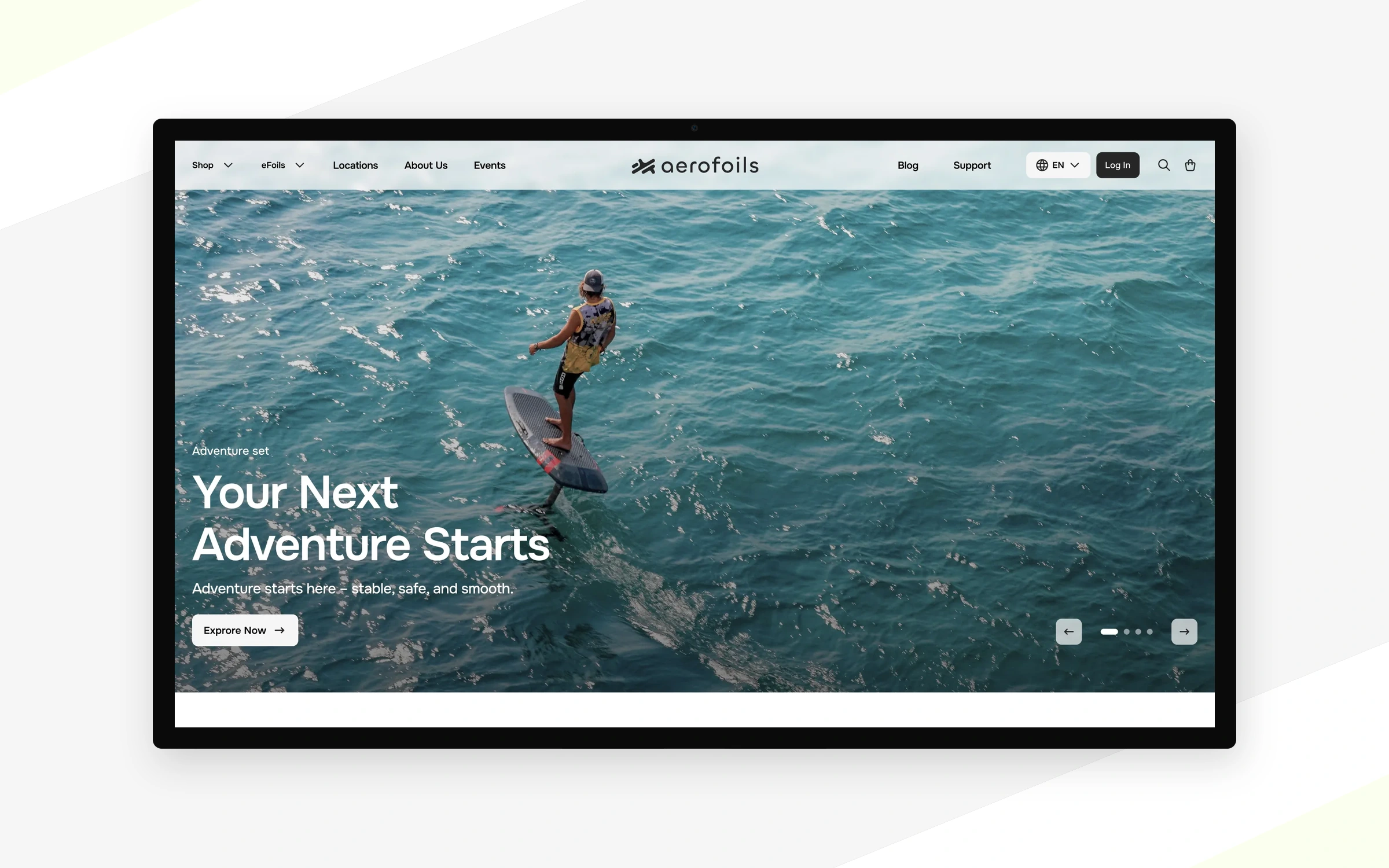
Reported by Aerofoils after the website redesign.
Brand and e-commerce design for a German electric hydrofoil manufacturer, with a focus on board selection and configuration.
“They paid attention to every little detail and developed a great understanding of our product and values very quickly.”
 Lasse AssmannHead of Marketing, Aerofoils

A full SaaS prototype, delivered fast
A complete SaaS platform prototype in Figma.
“Nexa Design provided a great design with fast delivery.”
 Sebastian MartensenCEO, Zen Operator

40% less time gathering information for municipal project reviews
Measured after the redesign and reported to Nexa.
We helped define the product and designed municipal review, mapping and builder workflows around a shared project context.
[TBD: client quote, name and photo for this project]View case study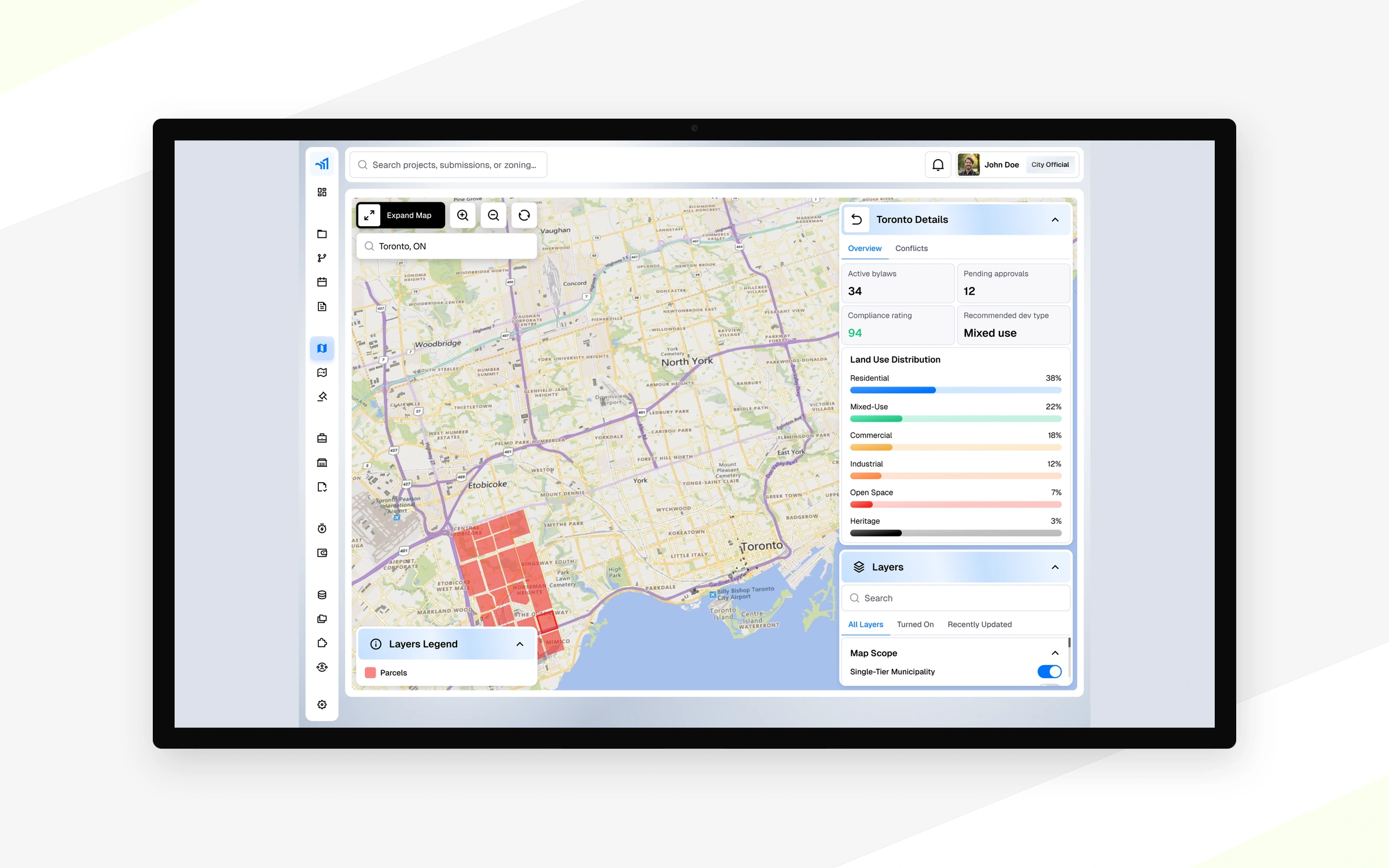

One overview for complex healthcare infrastructure projects
Designed: budget, schedule, program, sourcing and procurement areas.
[TBD: client quote, name and photo for this project]View full case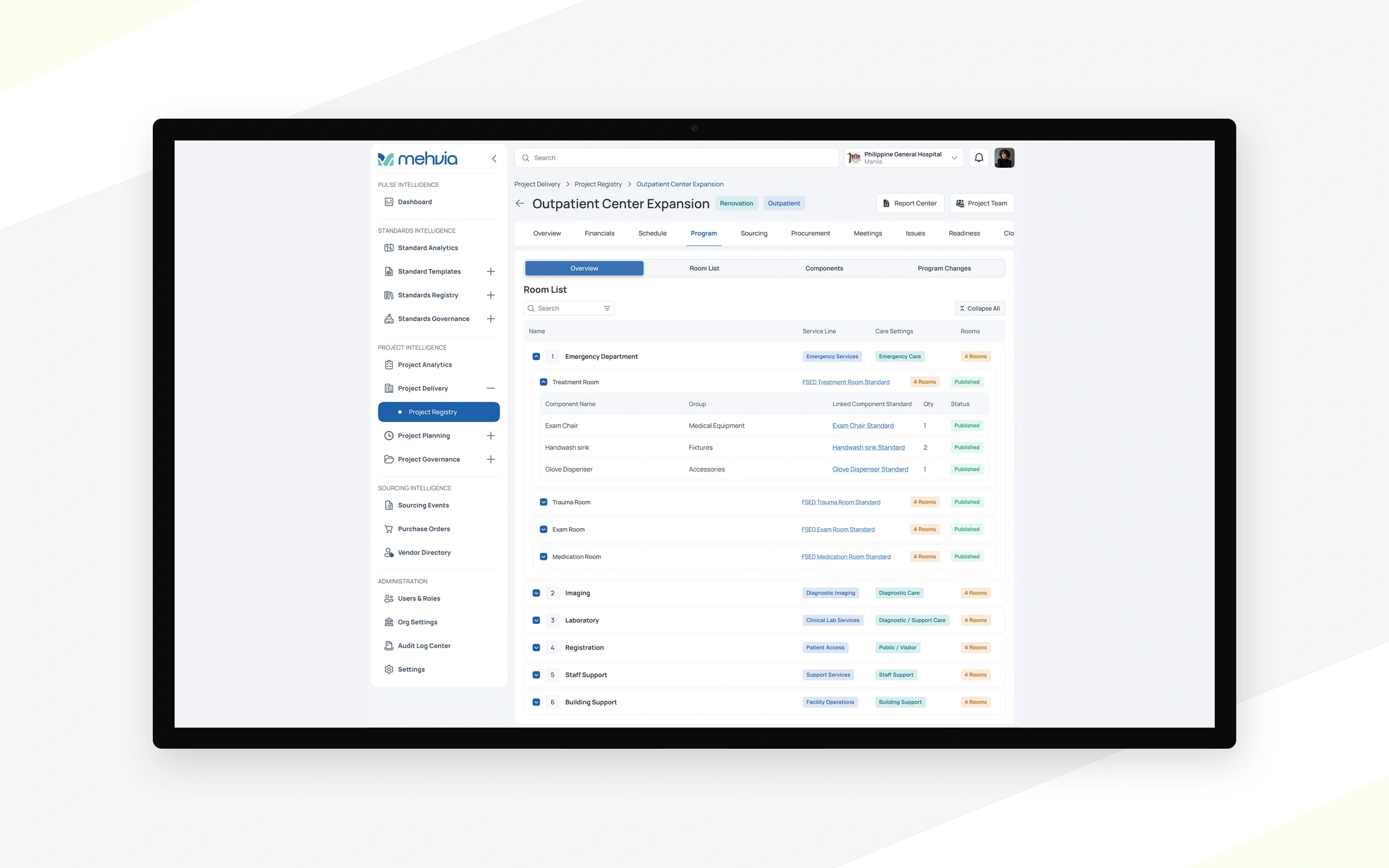
What we design
for martech
Product UI, websites and design systems, depending on what your product needs now.
Analytics dashboards
Metrics with a clear hierarchy, filters and drill-downs people actually use.
Campaign management tools
Setup, targeting and budgets in a flow that is quick to repeat.
Content and publishing platforms
Editors, templates and article layouts that scale with your content.
Reporting and exports
Shareable reports that make sense outside the product.
Brand and content graphics
Article visuals and templates that keep every page on brand.
Marketing websites
Sites that explain a data-heavy product in plain words.
We understand
the business behind the product
The way we work depends on where your product is. Pick the stage that fits to see the flow.
We map user roles, permissions, business rules and product requirements before defining how the interface should behave.
- Roles
- Rules
- Requirements
We design interactions around the tasks people complete every day, not around technology demos.
- User flows
- First-use experience
Reusable components and consistent interaction patterns support new functionality as your product grows.
- Tokens
- Components
- Type scale
Organised Figma files, prototypes, component states and specifications help engineering teams build the experience.
- Figma files
- States
- Specs
We review the current product and find what blocks users most.
- Usability issues
- Priorities
We agree on the visual direction before touching real screens.
- Colours
- Type
- References
Key screens get the new colours, type and proportions.
- Key screens
- Visual direction
The redesigned product, working with real states, filters and drill-downs.
- UI screens
- States
- Prototype
Optional. We simplify the flows that slow people down, like long checkouts or setups.
- Optional
- Shorter flows
Your team shares what is needed this sprint: new features, changes, roles.
- Tasks
- Priorities
Our designer turns the request into layouts and screens inside your process.
- Wireframes
- Screens
Your team leaves comments right on the mock-ups.
- Comments in Figma
We work through every comment and mark it done, then hand over.
- Updated screens
- Handoff
How a martech design
project runs
Four stages, from your requirements to files your developers can build from. The board shows what we do at each stage and where we need your team.
Step 01 / 04
Product requirements
We review your product, audience, goals, technical constraints and the systems and data you already have.
Architecture and flows
We organise user roles, key interactions, complex workflows and the information architecture around them.
UI design and prototypes
We design interfaces, interaction states and clickable prototypes for the key scenarios.
Validation and handoff
We review critical use cases with your team and prepare agreed specifications for implementation.
YouContext, feedback and sign-off
Analysis & UXRequirements, roles and flows
UI designScreens, states and components
Prototype & handoffBehaviour in context
- Your team
- Nexa
- Key deliverable
Stage by stage
01Product requirements
- Product & data accessYou
Access to the product, analytics and technical docs, plus what your team knows about the domain rules.
- Requirements reviewAnalysis & UX
Business goals, users, technical constraints and the decisions the product should support.
- Domain rules & limitsAnalysis & UX
What the product can and cannot do, and where people need to check or correct data.
- Product & data accessYou
02Architecture and flows
- Flow sign-offYou
You confirm the journeys and roles, with your engineers on what the data and the systems allow.
- User roles & permissionsAnalysis & UX
Who sees what, who approves key actions and who changes the settings.
- Key workflowsAnalysis & UX
Requests, suggestions, human review and the way back when a result is wrong.
- Information architectureAnalysis & UX
Navigation and the screen map for complex, data-heavy workflows.
- Flow sign-offYou
03UI design and prototypes
- Reviews & sign-offYou
Your notes on each round of screens and the prototype, and the final sign-off.
- UI screensUI design
Final interfaces for the key scenarios, with a clear hierarchy for dense data.
- Edge-case statesUI design
Loading, results, low confidence, errors and empty states, designed from the start.
- ComponentsUI design
Reusable components with variants, built from the screens.
- Clickable prototypePrototype & handoff
Key scenarios you can click through to discuss behaviour in context.
- Reviews & sign-offYou
04Validation and handoff
- Critical use-case reviewPrototype & handoff
A walk-through of the cases where a mistake costs the most.
- SpecificationsPrototype & handoff
Figma files, component states and agreed specifications your developers can build from.
- Critical use-case reviewPrototype & handoff
Launch something new.
Improve what exists.
Whether you are building an MVP or adding features to an established platform, our design services adapt to your product stage.
Not sure which one fits? Discuss your project
Martech product and MVP design
Newproduct
From a concept to a prototype.
Turn a concept into clear user flows, product interfaces and an interactive prototype ready for discussion and development.
Designer · design lead · business analyst · project manager
- User flows
- Product interfaces
- Interactive prototype
Martech product redesign
Existingproduct
Keep what works, fix the rest.
Simplify existing workflows, improve usability and add new functionality without losing what already works.
Designer · design lead · business analyst · project manager
- Simpler workflows
- Better usability
- New features inside existing flows
Dedicated product designers
Ongoingsupport
Design capacity inside your team.
Add UX/UI capacity for new features, design-system work and improvements alongside your product team.
Designer · design lead support
- New features
- Design-system work
- Ongoing improvements
What clients say after the project
Founders, marketing and product leads on working with our team.
5.0Rated on Clutch“They paid attention to every little detail and developed a great understanding of our product and values very quickly.”
10% revenue growth over a quarter
Lasse AssmannHead of Marketing, AerofoilsView case 
“Everything has been perfect.”
20K+ weekly views · +20% sharing
 5.0
“We received excellent designs that we could use for product development.”
Dashboards ready for development
 Alex GiffordLead Designer, Crowdstake
“Their agility, the ability to challenge the status quo, and the capacity to suggest better solutions were impressive.”
MVP launched, first early adopters signed
 Denys MalykhinCEO, software company
“Nexa Design provided a great design with fast delivery.”
Figma prototype delivered
Sebastian MartensenCEO, Zen OperatorView case Questions about
martech design

Can you redesign dashboards without changing our data model?
Usually yes. We work with the data you already have and focus on hierarchy, filters and how people move between views.
Do you design content templates as well as product UI?
Yes. We can design article layouts, graphics and templates alongside the product, so content and interface look like one brand.
How can we work with you?
Choose a fixed-price project for an agreed scope, a full-time designer from $4,500/month, part-time design at $35/hour from 10 hours a week, or a Nexa team with a custom scope and time-and-materials billing. We confirm the format and terms in your proposal.
Can you work on an existing product?
Yes. Bring a campaign report or dashboard your team relies on today. Show us one question it should answer and where people leave the tool to finish the job. We can focus the redesign on that task while keeping familiar labels and reporting conventions that marketers already use.
What should we define before designing a campaign dashboard?
Start with who uses the dashboard, which campaigns they compare and what decision they need to make. Then map the data, filters and time periods that support that decision. This gives the design team a concrete task to test as the dashboard takes shape.
Other industries
Let’s build your
next product together
- 01
You tell us about the product
Book a call or send a short brief. A link and a few lines are enough.
- 02
30-minute call
We discuss the product, scope, timeline and the format that fits.
- 03
Estimate or a designer match
You get a fixed-price estimate with stages, or a designer to start in your team.